


Whitelabel Error Page: What It Is, Why It Happens, and How to Fix It
Introduction
If you’ve ever worked with a Spring Boot application, you’ve probably encountered the Whitelabel Error Page. This default error page appears when your application encounters an unexpected issue and doesn’t have a custom error page configured. While it may look confusing to end users, it serves as a helpful debugging tool for developers.
In this guide, we’ll explain what the Whitelabel Error Page is, why it appears, common causes, and the best ways to resolve and prevent it.
What Is a Whitelabel Error Page?
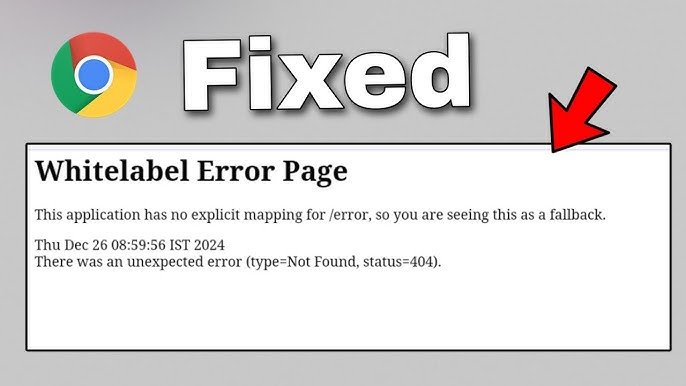
The Whitelabel Error Page is Spring Boot’s built-in fallback error page. It is displayed whenever an application encounters an error and no custom error handling mechanism is available.
Typically, the page displays a message similar to:
“This application has no explicit mapping for /error, so you are seeing this as a fallback.”
It may also include details such as:
- HTTP status code (404, 500, etc.)
- Timestamp
- Exception type
- Error message
- Request path
This information is primarily intended for development and troubleshooting rather than production environments.
Why Does the Whitelabel Error Page Appear?
Several issues can trigger the Whitelabel Error Page. Some of the most common include:
1. Missing URL Mapping
A user may request a URL that doesn’t exist in your application, resulting in a 404 error.
Example:
http://localhost:8080/profileIf no controller handles the /profile route, the Whitelabel Error Page may appear.
2. Server-Side Exceptions
If your application throws an unhandled exception while processing a request, Spring Boot displays the default error page.
Examples include:
- NullPointerException
- Database connection failures
- Invalid application logic
- Runtime exceptions
3. Missing Templates
Applications using Thymeleaf or another template engine may show the Whitelabel Error Page if a required HTML template is missing.
For example:
return "dashboard";If dashboard.html does not exist, an error is generated.
4. Configuration Errors
Incorrect configuration in files like application.properties or application.yml can prevent the application from functioning correctly.
Examples include:
- Invalid database credentials
- Incorrect server port
- Missing environment variables
5. Dependency Issues
Conflicting or missing Maven or Gradle dependencies can cause application startup or runtime failures.
Always ensure dependencies are compatible with your Spring Boot version.
Common HTTP Status Codes
The Whitelabel Error Page often accompanies one of these HTTP status codes:
| Status Code | Meaning |
|---|---|
| 404 | Resource not found |
| 400 | Bad request |
| 403 | Access forbidden |
| 405 | Method not allowed |
| 500 | Internal server error |
Understanding the status code helps narrow down the root cause.
How to Fix the Whitelabel Error Page
Check Your URL
Verify that the requested URL matches an existing controller mapping.
Example:
@GetMapping("/home")
public String home() {
    return "home";
}
Ensure you’re visiting:
http://localhost:8080/homeReview Application Logs
The application logs usually contain the complete stack trace and exception details.
Look for:
- Exception names
- Line numbers
- Root causes
Logs often provide far more information than the error page itself.
Verify Controller Mappings
Confirm that every endpoint is correctly annotated.
Example:
@RestController
public class UserController {

    @GetMapping("/users")
    public String users() {
        return "User List";
    }
}
Check Template Files
If using Thymeleaf:
- Place HTML files inside:
src/main/resources/templates/- Ensure filenames exactly match those returned by controllers.
Validate Configuration
Review:
- Database URL
- Username
- Password
- Server port
- Active Spring profiles
Even a small typo can lead to runtime errors.
Add Custom Error Pages
Instead of displaying the default Whitelabel Error Page, create your own error pages.
Example:
src/main/resources/templates/error.htmlSpring Boot automatically serves this page for many application errors.
How to Disable the Whitelabel Error Page
You can disable the default page by adding the following property:
server.error.whitelabel.enabled=falseThis prevents Spring Boot from displaying the built-in fallback page.
Best Practices to Avoid Whitelabel Errors
Follow these recommendations to reduce the likelihood of encountering the Whitelabel Error Page:
- Test all application routes thoroughly.
- Implement global exception handling.
- Create custom error pages.
- Validate application configuration before deployment.
- Monitor logs regularly.
- Keep dependencies updated.
- Write unit and integration tests.
These practices improve application stability and user experience.
Whitelabel Error Page in Production
Displaying the default Whitelabel Error Page in production is generally discouraged because it may expose technical details that are useful to attackers.
Instead:
- Display user-friendly error messages.
- Log detailed exceptions internally.
- Hide stack traces from users.
- Implement centralized exception handling.
- Return appropriate HTTP status codes.
This creates a more secure and professional application.
Frequently Asked Questions
Is the Whitelabel Error Page a bug?
No. It is Spring Boot’s default fallback page for handling unconfigured application errors.
Can I customize it?
Yes. You can create custom error pages or implement your own exception handlers to replace it.
Does it only appear in Spring Boot?
Yes. The Whitelabel Error Page is specific to Spring Boot applications.
Should I disable it?
During development, it can be useful for debugging. In production, replacing it with custom error handling is generally recommended.
Also Read:StreamEastV2: Everything You Need to Know About the Popular Sports Streaming Platform
Conclusion
The Whitelabel Error Page is an important feature of Spring Boot that helps developers identify application issues during development. Although it may appear alarming at first, it simply indicates that an error occurred and no custom error page is available.
By understanding its causes, checking logs, verifying routes, fixing configuration issues, and implementing custom error handling, you can quickly resolve problems and provide a better experience for your users. Replacing the default page with customized error pages is a best practice for any production-ready Spring Boot application.